Contrast is the difference in brightness between text and its background. Too little and text becomes hard to read for people with low vision, for anyone on a phone in sunlight, and for most of us late in the day. The Web Content Accessibility Guidelines (WCAG) turn that into numbers you can check.
The rules in brief
| What | Minimum ratio (level AA) | WCAG criterion |
|---|---|---|
| Normal text | 4.5:1 | 1.4.3 Contrast (Minimum) |
| Large text: 18 pt (about 24 px) or 14 pt (about 18.5 px) bold and above | 3:1 | 1.4.3 Contrast (Minimum) |
| Interface parts and meaningful graphics: icons, input borders, focus indicators | 3:1 | 1.4.11 Non-text Contrast |
Ratios run from 1:1 (no difference) to 21:1 (black on white). They are calculated from the relative luminance of the two colours, and WCAG is explicit that a result should not be rounded up to reach a threshold: 4.49:1 fails.
Key takeaway
Normal text needs 4.5:1. Large text, icons and input borders need 3:1.
A real example: our own palette
We measured the colours this website uses. Most combinations pass comfortably, but two results are instructive.
| Combination | Ratio | Normal text (4.5:1) | Large text and UI (3:1) |
|---|---|---|---|
Black text #000000 on bone background #e3e2dd | 16.18:1 | Pass | Pass |
Charcoal text #1a1a1a on bone background #e3e2dd | 13.41:1 | Pass | Pass |
Dark grey text #444341 on bone background #e3e2dd | 7.61:1 | Pass | Pass |
Mid grey text #6b6a67 on bone background #e3e2dd | 4.16:1 | Fail | Pass |
Bone text #e3e2dd on black background #000000 | 16.18:1 | Pass | Pass |
Amber accent #f2b33d on black background #000000 | 11.29:1 | Pass | Pass |
Amber accent #f2b33d on bone background #e3e2dd | 1.43:1 | Fail | Fail |
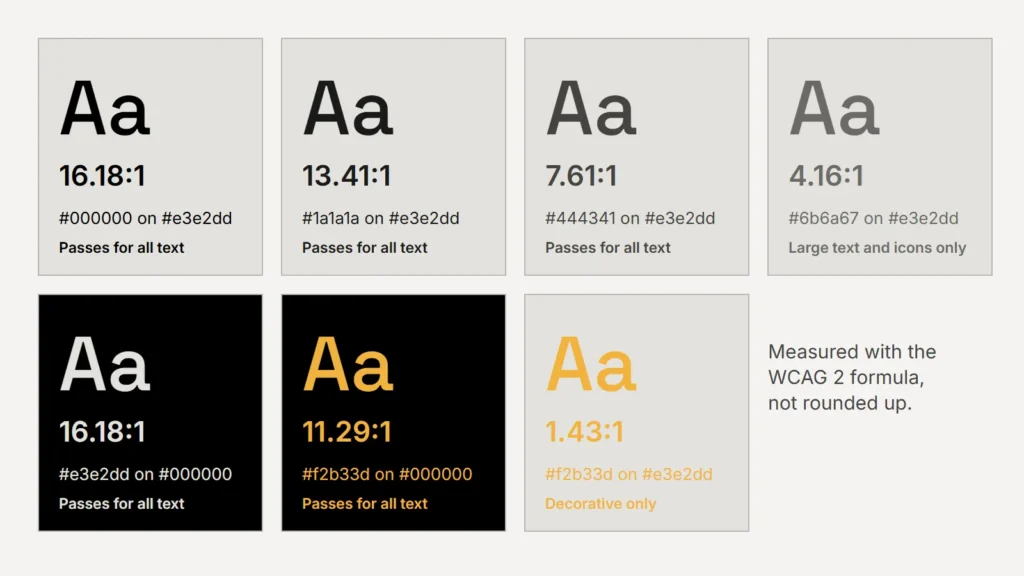
Our mid grey looked perfectly readable on screen, yet it measures 4.16:1 on the bone background, just short of 4.5:1. An automated accessibility check flagged it on small date labels while we built our blog, and we switched those labels to the darker grey. The mid grey still works for large text and decorative rules.
Amber shows the other common pattern: a colour that works beautifully on black fails badly on a light background. That doesn’t make it a bad brand colour. It means the guidelines should say where it may carry text and where it is decoration only.
A colour isn’t accessible or inaccessible on its own. Pairs are.
A practical checking process
- List every text and background pair your brand actually uses, including text on photographs and on buttons.
- Measure each one with a contrast checker and record the ratio next to it in the guidelines.
- Mark each pair as “any text”, “large text and icons only” or “decorative only”.
- For colours that fail with text, add a darker or lighter companion shade for text use, rather than changing the brand colour itself.
- Recheck whenever a colour, font weight or background changes.
Beyond the ratio
Contrast is necessary but not sufficient. Don’t rely on colour alone to carry meaning — pair red error states with a message and an icon, and underline links in body text. Test focus outlines on every background they can appear on. And remember that thin, light font weights reduce legibility even when the colours pass.