Alt text is a short written alternative for an image, added in the code with the alt attribute. Screen readers read it aloud, and browsers show it when an image fails to load. The W3C’s images tutorial sets the principle: images must have text alternatives that describe the information or function they represent. That last part, information or function, is the key to writing it well.
First, decide what the image is for
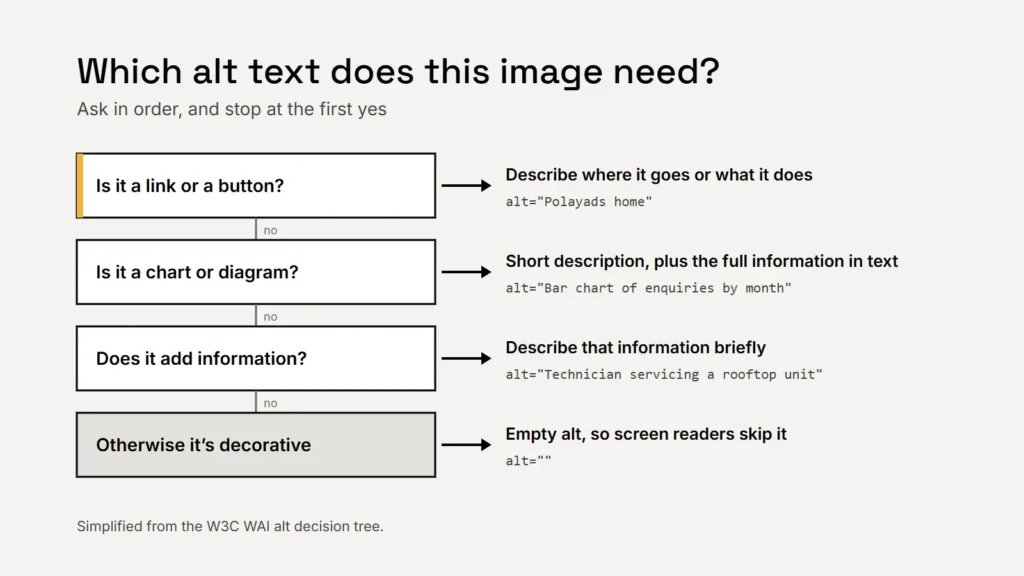
The W3C publishes a decision tree for this. Most images on a business site fall into one of five kinds.
| Kind of image | What the alt text should do | Example |
|---|---|---|
| Informative photo | Describe the information it adds, briefly | alt="Technician servicing a rooftop air-conditioning unit" |
| Decorative image | Nothing: use empty alt so screen readers skip it | alt="" |
| Linked logo or icon | Say where the link goes or what it does | alt="Polayads home" |
| Logo that isn’t a link | Give the name in the logo | alt="Polayads" |
| Chart or diagram | A short description, plus the full information in text | alt="Bar chart of enquiries by month, 2025" and a table |
Logos
The W3C’s guidance on functional images is specific: a logo that links to the home page should convey the action, so “Example.com homepage” rather than “Example.com logo”. If the link already has visible text next to the logo, such as “Home”, the logo can have empty alt to avoid repeating it. For a logo that isn’t a link, the alt text is simply the organisation’s name; the W3C notes there’s no need to mention that it’s a logo.
Logos are also an exception to the general rule against putting text in images. WCAG treats text that is part of a logo or brand name as essential, so a logo can be an image as long as it has a text alternative. Everything else, such as headlines and offers, should be real text.
Key takeaway
Never write “logo” or “image” in alt text. Screen readers already announce that it’s an image.
Photos
Describe what the photo contributes, in a short phrase. A photo on a service page might be “Two technicians loading equipment into a company van”. A stock photo that only sets a mood is decorative: give it empty alt. The W3C’s examples include a family photo given the alt text “We’re family-friendly”, because that is the point the photo makes on that page.
Icons
An icon next to a visible word, such as a phone icon beside “Call us”, is decorative and needs empty alt. An icon that stands alone, like a magnifying glass for search or a social media icon linking to your profile, needs alt text naming its function: “Search”, or “Polayads on LinkedIn”.
Alt text describes what the image does on the page, not just what it shows.
Charts and diagrams
A chart can’t be summed up in a phrase. The W3C says complex images need a two-part alternative: a short description in the alt text, then a longer one with the essential information, such as a data table or a paragraph next to the image. If the information is already in the text around it, the short description is enough.
Missing is worse than empty
Leaving out the alt attribute is not the same as empty alt. MDN notes that without it, some screen readers may read out the image’s file name instead, which is how people end up hearing “IMG underscore 4 0 2 3 dot jpeg”. Empty alt (alt="") tells assistive technology the image can be skipped.
And search?
Google uses alt text to understand images too, and asks you to avoid stuffing it with keywords, which it says creates a bad experience and can make a site look like spam. Its example of good alt text is simply “Dalmatian puppy playing fetch”. Write it for people and it will work for search. Google also suggests short, descriptive file names, such as rooftop-ac-service.jpg instead of IMG00023.JPG.
Checklist
- Decide what each image is for before writing.
- Linked logos say where they go.
- Decorative images get empty alt.
- Charts get a short alt plus the full information in text.
- No keyword stuffing, and no “image of”.
Alt text is one part of making a site accessible. Our guide to ADA and website accessibility and our article on accessible brand colours cover more.