More than one in four adults in the United States has some type of disability, according to the Centers for Disease Control and Prevention. Some can’t see a screen and listen to it instead; some can’t use a mouse and move through pages with a keyboard or a switch; some need captions, larger text or a calmer layout. When a website doesn’t work for them, the business loses a customer, and it may also be failing a legal duty.
This article explains that duty in plain terms and sets out a practical way to meet it. It is general information, not legal advice. If you have received a complaint or a demand letter, speak to a lawyer.
What the law says
The Americans with Disabilities Act (ADA) became law in 1990, before most businesses had websites. Two parts of it matter here. Title III covers businesses open to the public, such as shops, restaurants, clinics, hotels and professional services. Title II covers state and local governments.
The Justice Department’s position, set out in its 2022 guidance on web accessibility, is that the ADA’s requirements apply to the goods, services and programs these organisations offer online. For businesses, the guidance makes two further points:
- There is no detailed federal regulation setting a technical standard for business websites, so businesses have some flexibility in how they make their sites accessible.
- Existing standards, including the Web Content Accessibility Guidelines (WCAG), provide helpful guidance on how to do it.
The ADA can be enforced by the Justice Department and through private lawsuits. A website that genuinely works for disabled visitors is the best protection, and it works better for everyone else too.
The government rule, and why it may still matter to you
In April 2024 the Justice Department published a rule that does set a technical standard, WCAG 2.1 Level AA, for state and local governments. An interim rule in April 2026 extended its deadlines by a year: governments serving 50,000 people or more now have until 26 April 2027, and smaller governments and special districts until 26 April 2028.
The rule doesn’t apply to private businesses directly. But it covers web content and apps that governments provide through contractors and other arrangements, so if you build, host or run anything public-facing for a city, county, school district or public college, expect the contract to require WCAG 2.1 AA.
| Who you are | What applies | Standard to aim for |
|---|---|---|
| A business open to the public | ADA Title III, as explained in the Justice Department’s 2022 guidance | No set standard; WCAG is the recognised benchmark |
| A state or local government | ADA Title II and the 2024 web rule | WCAG 2.1 AA, from April 2027 or April 2028 |
| A supplier to a government | The rule, through your contract | WCAG 2.1 AA, as the contract specifies |
Which standard to aim for
WCAG is published by the World Wide Web Consortium (W3C). Its success criteria are graded A, AA and AAA, and Level AA is the level laws and contracts usually refer to. The current version, WCAG 2.2, was published in October 2023, and the W3C encourages people to use the latest version.
WCAG 2.2 is backwards compatible: a site that meets 2.2 also meets 2.1 and 2.0, apart from one criterion that 2.2 made obsolete. So WCAG 2.2 Level AA is a sensible target for a new site or a redesign, and it also satisfies a contract that asks for 2.1 AA.
Key takeaway
Aim for WCAG 2.2 Level AA. It covers the 2.1 standard in the government rule and is the benchmark your site is most likely to be judged against.
What usually goes wrong
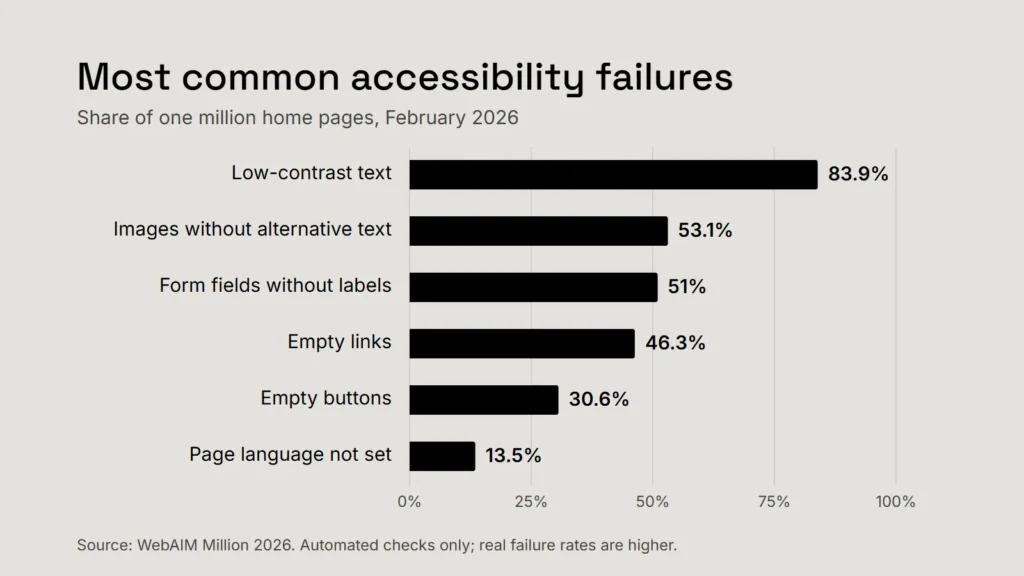
Every year WebAIM, a non-profit organisation based at Utah State University, runs automated checks on the home pages of the top one million websites. In February 2026 it detected WCAG failures on 95.9% of them, with an average of 56 errors per page. Most of those errors fall into a handful of familiar types.
| Failure | Home pages affected | The usual fix |
|---|---|---|
| Low-contrast text | 83.9% | Text colours with at least 4.5:1 contrast against their background (3:1 for large text) |
| Images without alternative text | 53.1% | A short description of what each meaningful image shows; empty alt text for purely decorative ones |
| Form fields without labels | 51% | A visible label tied to every field, not just placeholder text |
| Empty links | 46.3% | Link text, or an accessible name for icon-only links, that says where the link goes |
| Empty buttons | 30.6% | An accessible name for every button, especially icon buttons such as menu and search |
| Page language not set | 13.5% | The page’s language declared in its code, so screen readers pronounce it correctly |
Most of these are quick to fix in a site’s templates. Contrast is the most common of all; our article on accessible brand colours shows how to check a palette before it becomes a problem.
Automated checks only find part of the picture. WebAIM is clear that a page with no detected errors isn’t necessarily accessible, and the Justice Department’s guidance lists problems no scanner can fully judge: videos without captions, information conveyed by colour alone, forms with unclear instructions or error messages, and pages that only work with a mouse.
The five-minute keyboard test
- Put the mouse aside. Press Tab to move forward through the page and Shift + Tab to move back.
- Can you always see where you are? Every link, button and field should show a clear focus outline.
- Can you open the menu, close any pop-up with Esc, and reach everything a mouse user can?
- Can you complete your enquiry, booking or checkout form, including its error messages, using only the keyboard?
- Does the order make sense, or does focus jump around the page or get stuck?
Five minutes of this on your three most important pages will tell you more than most reports. Then try your phone’s built-in screen reader (VoiceOver on iPhone, TalkBack on Android) on the same pages.
If you can’t complete your own enquiry form without a mouse, some of your customers can’t either.
Why an overlay isn’t a shortcut
Accessibility overlays are scripts, often sold as a single line of code, that promise to make a website accessible or compliant automatically. Treat that promise with care. In April 2025 the Federal Trade Commission approved a final order requiring one of the best-known overlay vendors, accessiBe, to pay $1 million. The FTC alleged that the company’s claims that its tool could make any website WCAG-compliant were false, misleading or unsubstantiated, and that it presented promotional content as independent reviews.
The order bars the company from claiming that its automated products can make a site compliant, or keep it compliant, unless it has evidence to support the claim. The lesson is wider than one vendor: accessibility comes from a site’s own code and content, and a widget on top can’t reliably repair what is underneath.
A practical plan
- Check where you stand. Run a free automated checker such as WAVE on your key pages, then do the keyboard test above. Write down what you find.
- Fix the templates first. Most problems live in the header, menu, footer, buttons and form styles shared by every page. One fix there corrects the whole site.
- Fix the journeys that matter most. Contact, booking, quote and checkout come before the archive of old news.
- Check what you embed. To a visitor, booking widgets, chat tools, maps and payment forms are part of your site. Ask suppliers for an accessibility conformance report, and test their parts with the keyboard too.
- Publish an accessibility statement. Say what standard you aim for, what you know isn’t right yet, and how people can tell you when something doesn’t work. Then reply quickly when they do.
- Make it routine. Alternative text for every new image, captions for every new video, a keyboard check before every launch, and a fuller review once a year.
None of this has to happen at once. A site that is visibly improving, with a clear way to report problems, is far better placed, for its visitors and for the business, than one that waits for a complaint.
Checklist
- Treat the website as part of serving the public.
- Aim for WCAG 2.2 Level AA.
- Fix contrast, alt text, labels, and link and button names first.
- Test with a keyboard, not only a scanner.
- Avoid anything sold as instant compliance.
- Publish a statement and a way to report problems.
Related service
Accessible, fast websites built around the people who use them.
Sources
- US Department of Justice: Guidance on web accessibility and the ADA (March 2022)
- US Department of Justice: Fact sheet on the state and local government web rule, with the extended compliance dates
- Federal Register: Extension of compliance dates for the state and local government web rule (April 2026)
- W3C Web Accessibility Initiative: WCAG 2 overview
- WebAIM: The WebAIM Million, 2026 report
- Federal Trade Commission: FTC approves final order requiring accessiBe to pay $1 million (April 2025)
- Centers for Disease Control and Prevention: Disability impacts all of us
- WebAIM: WAVE web accessibility evaluation tool