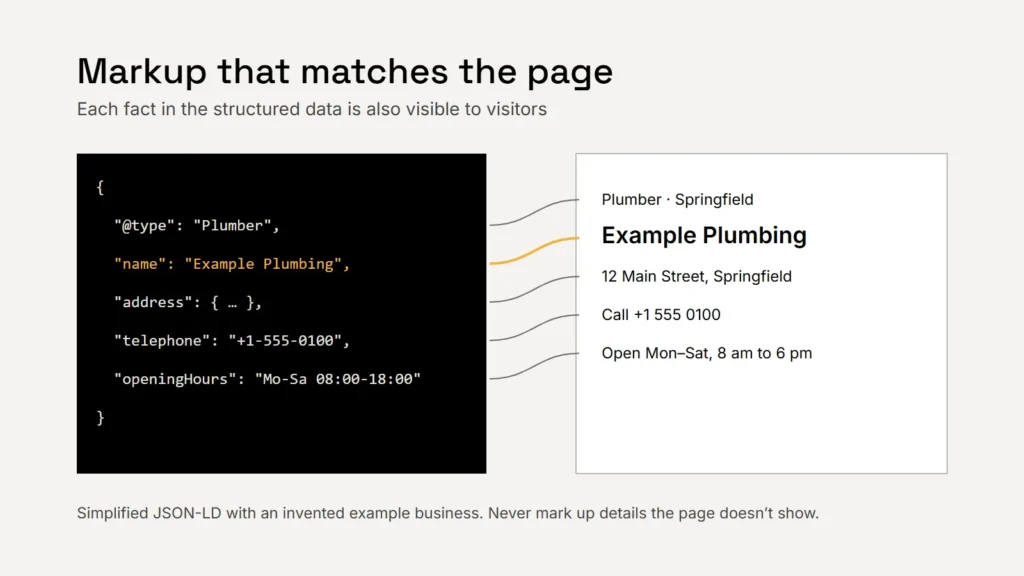
Google describes structured data as a standardised format for providing information about a page and classifying its content. A visitor reads your contact page and understands it is a plumbing business open on Saturdays. Structured data states the same facts in a fixed vocabulary, Schema.org, so a search engine doesn’t have to guess.
What it can and can’t do
Structured data can make a page eligible for richer search features. But Google says plainly that it does not guarantee structured data will appear in results, even when it is marked up correctly. It also says a structured data manual action removes a page’s eligibility for rich results but doesn’t affect how the page ranks in web search. So think of it as accurate labelling, not a ranking lever.
Key takeaway
Structured data helps search engines understand you. It won’t rescue weak content or a slow site.
The format to use
Google supports three formats and recommends JSON-LD in most cases, because it is the easiest to implement and maintain: one block of code, separate from the page’s visible HTML. Most modern website platforms and SEO plugins output JSON-LD for you.
The types worth adding for a small business
| Type | Where | What it describes |
|---|---|---|
LocalBusiness (or a specific subtype) | Home or contact page | Name and address (both required by Google), plus phone, opening hours, URL and location |
Organization | Home or about page | Your logo, official name, contact points and profiles |
BreadcrumbList | Inner pages | Where the page sits in your site’s structure |
Article / BlogPosting | Blog posts | Headline, dates, author or publisher and images |
Product, Event and others | Only where they genuinely apply | Products you sell or events you run |
Google recommends using the most specific type that fits, such as Plumber, Dentist or HVACBusiness rather than the generic LocalBusiness. Keep the name, address and phone number identical to your Google Business Profile.
The rules that matter
- Only mark up what visitors can see. Google’s guidelines say not to mark up content that isn’t visible to readers of the page.
- Never mislead. No fake reviews, and no markup unrelated to the page’s focus.
- No self-serving review stars. Google says that when a business controls the reviews about itself, its pages using
LocalBusinessorOrganizationmarkup are ineligible for review stars. Testimonials on your own site won’t earn star ratings. - Keep it current. Change your hours or phone number in the markup when you change them on the page.
Structured data should repeat what the page already says, never add to it.
Shortcuts that no longer work
For a while, FAQ and how-to markup were popular ways to take up more space in results. Google restricted both in 2023, and in May 2026 it stopped showing FAQ rich results altogether. It has retired several other rich result types too. Write helpful FAQs for your visitors by all means, but don’t add markup expecting a special listing. Check Google’s search gallery for the features currently supported.
How to test it
- Rich Results Test: Google’s free tool shows which rich results a page’s structured data can generate, and flags errors.
- Schema Markup Validator: checks markup against the Schema.org vocabulary in general.
- Search Console: once a site is live, its reports show structured data issues across your pages. Our Search Console guide covers setting it up.
Checklist
- JSON-LD, generated by your platform where possible.
- The most specific business type, matching your Business Profile.
- Only what visitors can see.
- No review stars from your own testimonials.
- Test before and after publishing.
Related service
Sites built with clean, accurate structured data from the start.
Sources
- Google Search Central: Introduction to structured data markup
- Google Search Central: General structured data guidelines
- Google Search Central: Local business structured data
- Google Search Central: Review snippet structured data
- Google Search Central: Latest documentation updates
- Google: Rich Results Test
- Schema.org: Schema Markup Validator