Most owners only think about maintenance when something breaks: the contact form stops sending, the site shows a security warning, or an update takes the whole thing offline. Regular maintenance is how you stop that happening, and how you keep the site earning enquiries rather than slowly falling behind.
What maintenance actually involves
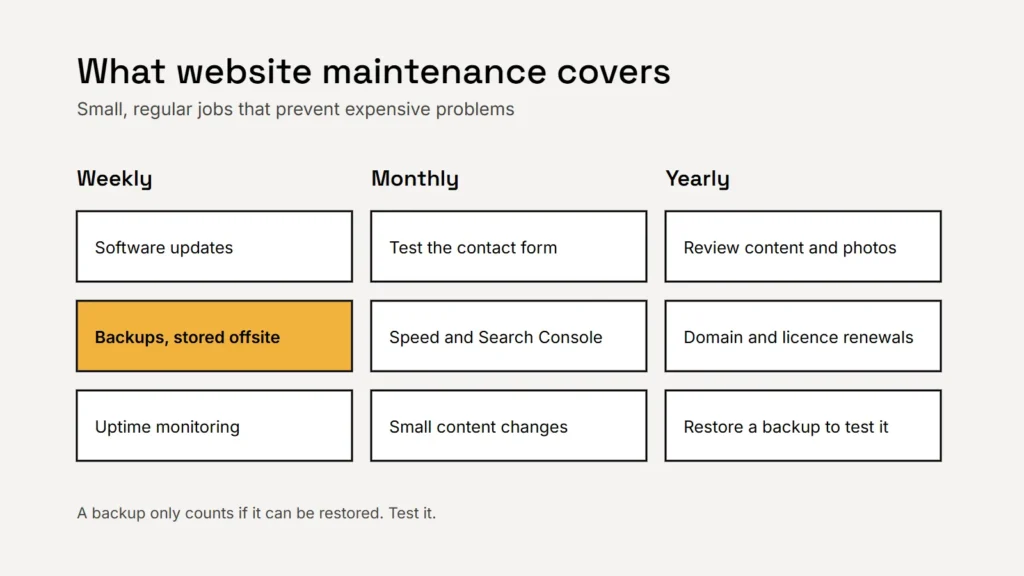
- Software updates. On WordPress, that means the core software, the theme and every plugin. Updates fix security holes and bugs, so they matter, but each one can occasionally clash with something else on the site.
- Backups. Regular copies of the files and database, stored away from the website itself, and tested so you know they can actually be restored.
- Monitoring. Checking that the site is up, that forms still deliver and that the security certificate renews.
- Security. Strong logins, removing unused plugins and users, and keeping the server software (such as PHP) on a supported version.
- Small changes. New photos, updated prices, opening hours, a new team member, a seasonal offer.
- Checks on search and speed. Looking at Search Console for errors and making sure pages stay fast as content is added.
Key takeaway
Maintenance is mostly prevention: updates, backups and checks that stop small problems becoming expensive ones.
What it costs
Prices across the industry range from a few dollars a month for automated updates to several hundred for a plan with guaranteed response times and development hours. The difference is mostly how much a person checks, and how much change time is included.
As a concrete example, these are our own care plans:
| Plan | Price | What’s included |
|---|---|---|
| Essential | $79/month | Updates, backups and monitoring, plus 30 minutes of minor changes each month |
| Business | $149/month | Everything in Essential, a short monthly report and 1 hour of minor changes |
| Priority | $249/month | Everything in Business, a priority support queue and 2 hours of minor changes |
Whoever you use, also budget for running costs that sit outside maintenance: hosting, the domain renewal, email and any paid plugins or fonts.
Do it yourself, or pay for a plan?
| Do it yourself | Care plan | |
|---|---|---|
| Cost | Your time, plus backup and security tools | A fixed monthly fee |
| Best for | Simple sites and owners comfortable with WordPress | Busy owners and sites that bring in work |
| Risk | Updates skipped when you’re busy; nobody notices a broken form | Choosing a plan that automates updates but never checks the result |
If you use a hosted builder such as Wix or Squarespace, the platform handles software updates for you, so maintenance is mostly content and checks. See our comparison of WordPress, Wix and Squarespace.
The cheapest maintenance plan is the one that catches a broken contact form the day it breaks.
What to ask before you sign up
- How often are updates applied, and does a person check the site afterwards?
- Where are backups stored, how long are they kept and when was a restore last tested?
- What happens if the site is hacked or goes down? Is the fix included?
- How much change time is included, and what happens to unused time?
- Do you check that forms still deliver enquiries?
- Can I cancel easily, and will I keep full access to my site, hosting and domain?
The last question matters most. Your logins and your domain should always be in your business’s name. Our guide to owning your domain explains why, and our website security basics cover what good upkeep protects against.
Checklist
- Updates, backups, monitoring and small changes are the core.
- Make sure a person checks the site after updates.
- Test that backups can be restored.
- Keep your logins and domain in your own name.
Related service
Website packages and care plans
Fixed-price websites, with optional care plans from $79 a month for updates, backups, monitoring and small changes.