A quick note first: we build most client sites on WordPress, so we have a view. We’ve tried to be fair here, and there are businesses we’d point to Wix or Squarespace instead. The right choice depends on how much you want to grow the site, and who will look after it.
The short answer
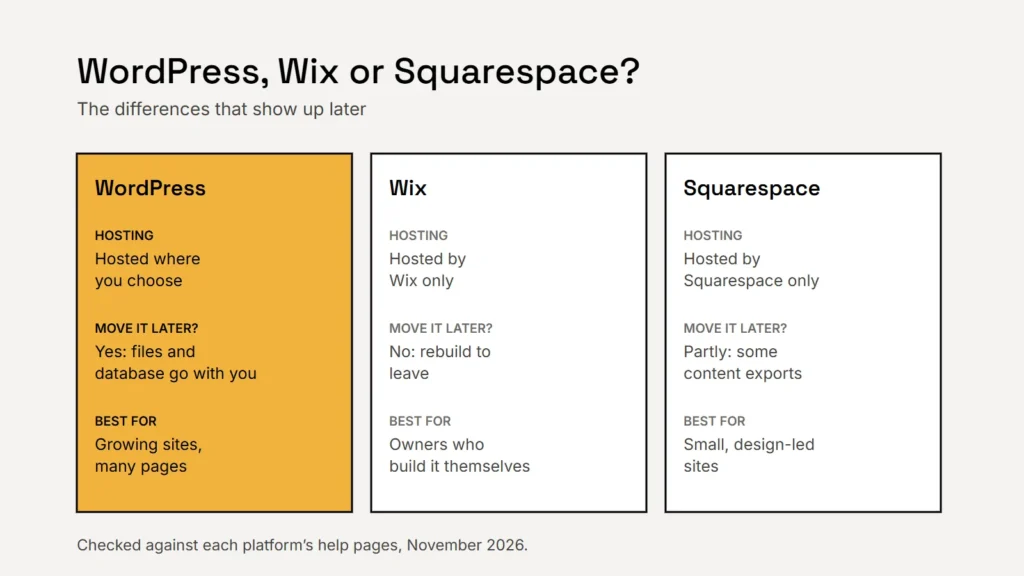
- Squarespace suits a small, design-led site that the owner updates themselves and doesn’t expect to grow much beyond a handful of pages.
- Wix suits an owner who wants to build and edit everything themselves with drag-and-drop, and is happy to stay on Wix long term.
- WordPress suits a business that wants to grow: many service and location pages, regular articles, booking or quote tools, and the freedom to change hosts or developers.
Key takeaway
Wix and Squarespace rent you a complete website. WordPress gives you software you own and host where you like.
How they compare
| WordPress | Wix | Squarespace | |
|---|---|---|---|
| What it is | Free, open-source software you install on hosting you choose | A hosted website builder | A hosted website builder |
| Who hosts it | Any host you choose | Wix only | Squarespace only |
| Move the whole site elsewhere | Yes, files and database go with you | No, Wix sites can’t be hosted elsewhere | Partly: some content exports to a WordPress file, much doesn’t |
| Ease for a beginner | Steeper; easy once set up well | Easiest to start | Easy, with polished templates |
| Growing to many pages | Strong | Fine for modest sites | Fine for modest sites |
| Add-ons and integrations | Tens of thousands of plugins | App market | Fewer, built-in features |
| Running costs | Hosting, domain, any paid plugins and upkeep | Monthly or yearly plan | Monthly or yearly plan |
Ownership and moving later
This is the difference most owners don’t think about until it matters. WordPress is open-source software released under the GPL licence: your site is a set of files and a database you can copy to any host. If you fall out with a developer or a host, you can take the site and go.
Wix states that its sites can’t be hosted anywhere else, because they run on Wix’s own technology. You can move your domain name, but rebuilding the site is the only way off the platform. Squarespace can export some content (basic pages, one blog and galleries) to a WordPress-format file, but many page types, product pages, styles and custom code don’t come across.
Whichever you pick, register the domain in your business’s name. Our guide to owning your domain name explains why.
Choose the platform you’d be happy to still be on in five years, or one you can leave.
What a service business needs from its site
For most service businesses, the website’s job is to turn local searches into calls and enquiries. That usually means:
- A page for each main service, and often for each town or area you serve, so you can be found for specific searches. See how to write service pages that help.
- Fast, clear pages on phones, with a tappable phone number and a short form.
- Booking or quote requests that fit how you actually work, often through an outside scheduling tool.
- Easy updates for prices, hours, photos and reviews, without calling a developer.
- Tracking enquiries, so you know which pages and searches bring in work.
All three platforms can do the basics. The gap opens as the site grows: dozens of service and location pages, articles, custom forms and connections to your other software are where WordPress’s flexibility pays off, and where a builder’s limits start to show.
The trade-offs of WordPress
WordPress isn’t automatically the better choice. It needs looking after: core, theme and plugin updates, backups and security checks. A badly built WordPress site, overloaded with plugins, can be slower and harder to use than a tidy Squarespace site. If nobody will maintain it, choose a hosted builder or pay for a care plan. Our website security basics cover what that upkeep involves.
How to decide
- If you’ll build it yourself and keep it small, start with Squarespace or Wix.
- If you expect more than 10 to 15 pages, regular articles or custom tools, choose WordPress.
- If you want freedom to switch developers or hosts, choose WordPress.
- If nobody will handle updates, choose a hosted builder or budget for maintenance.
- Whatever you choose, own the domain and keep copies of your words and photos.
Not sure your current platform is holding you back? Our free website review will tell you honestly whether to stay, fix or move.
Checklist
- Builders are easier to start; WordPress is easier to grow and to leave.
- Plan for the site you’ll need in two years.
- Own your domain and your content.
- Budget for upkeep if you choose WordPress.
Related service
Fixed-price WordPress websites for US small businesses, built to grow and fully yours.