When a business loses its domain, the damage is immediate: the website disappears, email bounces and every printed link stops working. It rarely happens because of hackers. It happens because the domain was registered by a former employee, a web designer or a relative, or because the renewal card on file expired and the reminders went unread.
Who actually owns your domain?
Nobody buys a domain outright. You register it for a period through a registrar, and the person or organisation named as the registrant holds it. ICANN, which coordinates generic domains such as .com, calls this person the Registered Name Holder. Whoever is named there, and whoever controls the registrar account, effectively controls the domain.
Key takeaway
The registrant should be your business, and the registrar account should belong to you, not to your designer or agency.
Check it today
- Find the registrar. A public registration lookup (RDAP or WHOIS) usually shows which registrar holds your domain and its expiry date, even when personal contact details are hidden for privacy.
- Log in yourself. Make sure you, not only a contractor, can sign in to that registrar account.
- Check the registrant. The registrant name should be your business.
- Agencies can still help. Give your agency or designer their own access where the registrar allows it, rather than letting them own the account.
What happens when a domain expires
For generic domains such as .com, ICANN’s Expired Registration Recovery Policy sets minimum rules that registrars must follow. Country-code domains, such as .us or .in, follow their own registry’s rules.
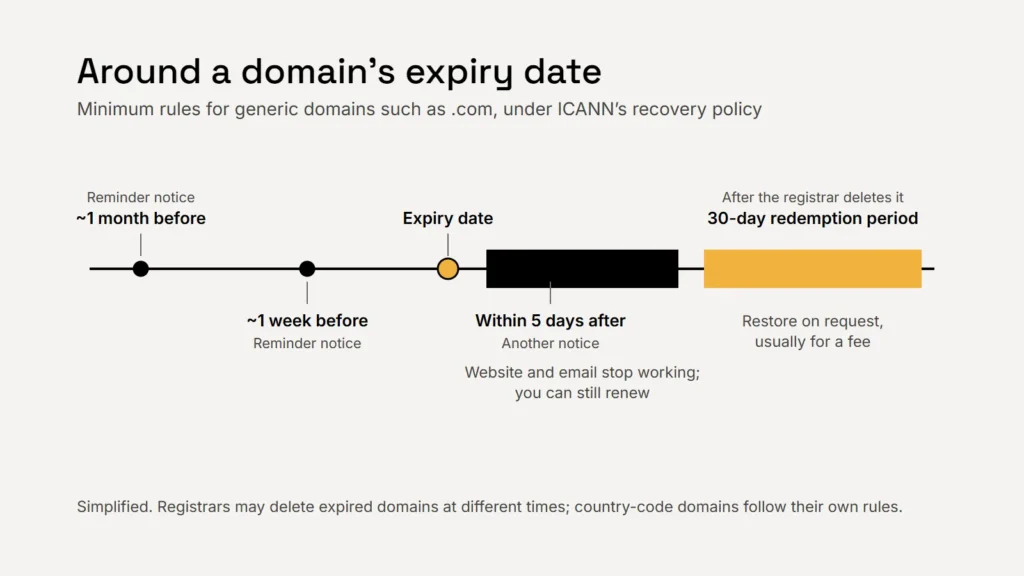
- Before expiry: the registrar must send at least two reminders, one about a month before and one about a week before.
- After expiry: if the domain isn’t renewed or deleted, the registrar must send another notice within five days, with renewal instructions.
- Things stop working: the policy requires the registrar to interrupt the domain’s DNS for a period after expiry, while the holder can still renew. That means your website and email go dark.
- Redemption: once a registrar deletes an expired generic domain, the registry must offer a 30-day Redemption Grace Period, during which the domain can be restored at your request, usually for an extra fee.
- Then it’s gone: after that, anyone can register it.
ICANN also requires registrars to make their renewal, late renewal and restore fees reasonably available when you register, so check them before you need them.
Most lost domains aren’t stolen. Their renewal reminders went to an inbox nobody reads.
Settings that prevent lock-out
| Setting | Why it matters |
|---|---|
| Auto-renew on, with a valid card | The simplest protection against an accidental lapse |
| A multi-year registration | Fewer renewal dates to miss |
| Contact email on a different domain | If your domain lapses, email at that domain stops too. ICANN suggests registrars advise a secondary email not tied to the domain itself |
| Two-factor sign-in on the registrar account | Stops someone taking over the account with a stolen password |
| Transfer lock on | Makes unauthorised transfers to another registrar harder |
| A calendar reminder before the expiry date | A back-up in case reminders are missed |
Your domain also runs your email
Your domain’s DNS records tell the world where your website and email live, and they also hold the SPF, DKIM and DMARC records that mailbox providers check. Be careful when changing DNS: removing the wrong record can stop email or a verification. Our guide to US email marketing rules explains those email records, and our website security basics covers protecting the accounts around your site.
Checklist
- Your business named as registrant.
- Your own login to the registrar.
- Auto-renew on, and a valid card.
- Contact email outside the domain.
- Two-factor sign-in and transfer lock.
Related service
Websites set up so the business owns its domain, hosting and accounts.