Analytics tools can usually tell when a visitor came from a search engine or another website. They often can’t tell which email, which social post or which printed QR code sent them. UTM tags fix that. They are short labels added to the end of a link, and analytics tools such as Google Analytics read them to record where each visit came from.
How a tagged link works
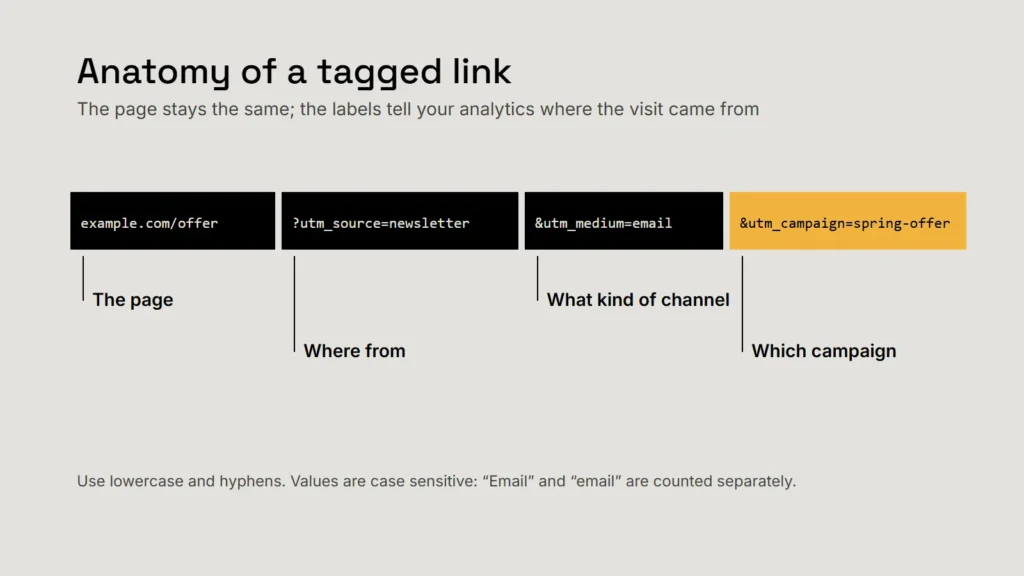
Everything after the question mark is a set of name-and-value pairs joined with ampersands. The page itself doesn’t change: visitors land exactly where they would have, and your analytics records the labels.
| Parameter | What it records | Example |
|---|---|---|
utm_source | Where the traffic came from | newsletter, linkedin, flyer |
utm_medium | The type of channel | email, social, print |
utm_campaign | The campaign or promotion | spring-offer |
utm_content | Which link or version, when there are several | header-button |
utm_term | The paid search keyword, where relevant | ac-repair |
utm_id | A campaign ID, if you use them | 2026-spring |
Google says you should always use utm_source, utm_medium and utm_campaign, and strongly recommends setting all the parameters that apply. Missing ones show up in reports as “(not set)”.
A naming system that stays clean
UTM data is only as good as its consistency. Google warns that values are case sensitive: google and Google are recorded as two different sources, and it recommends using lowercase as standard. A few rules keep reports readable:
- Lowercase everything, and use hyphens rather than spaces.
- Agree a short list of mediums (email, social, print, paid-social, referral) and stick to it.
- Name campaigns by what and when, such as
spring-offer-2026. - Keep a shared spreadsheet of every tagged link: the full URL, where it was used and when.
- Use a builder. Google’s free Campaign URL Builder assembles tagged links without typing errors.
Key takeaway
Decide the naming rules once, write them down, and make everyone use the same spreadsheet.
Where to use them, and where not to
| Use UTM tags on | Don’t use them on |
|---|---|
| Email newsletters and campaigns | Links between pages of your own website |
| Social media posts and profile links | Links you can’t control, such as other people’s reviews |
| QR codes on print, vehicles and signs | Paid ad platforms that already tag links automatically, unless their help says otherwise |
| Partner and directory listings you control |
A tagged QR code turns a printed flyer into something you can measure.
From visits to enquiries
Tags tell you where visits came from. To learn which sources bring enquiries, connect them to an action: set up a key event in your analytics for completed enquiry forms or booking confirmations, then compare sources by enquiries, not just visits. A source with modest traffic that brings real customers is worth more than a busy one that doesn’t.
Whatever you measure, keep it honest and proportionate: tell visitors what your analytics collects in your privacy policy, and collect only what you’ll use. Our article on measuring marketing honestly covers how to read the results without fooling yourself.
Checklist
- Always set source, medium and campaign.
- Lowercase, hyphens, an agreed list of mediums.
- Tag external links only, never internal ones.
- Log every tagged link.
- Judge sources by enquiries, not visits.
Related service
Market research and data analytics
Measurement set up around the decisions you need to make.