Google Analytics 4 records events: page views, scrolls, clicks and so on. A key event, in Google’s words, is an event that measures an action particularly important to the success of your business, and any event you collect can become one. Once enquiries are a key event, many standard reports, such as landing pages and traffic sources, show a key events column alongside visits.
The reliable way: a thank-you page
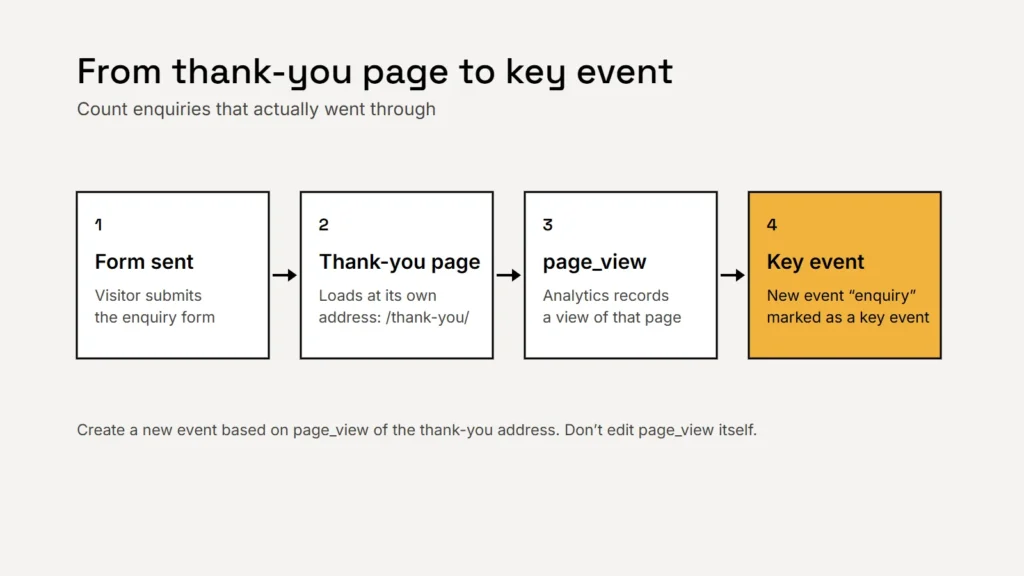
The cleanest approach is to send people to a thank-you page with its own address after they submit the form, such as /thank-you/, and count views of that page. It only loads when an enquiry has actually gone through.
Step by step
- Go to Admin, then Data display, then Events, and choose “Create event”.
- Name it something clear, such as
enquiry. Special characters aren’t allowed. - Choose “Create without code”, pick
page_viewas the event to base it on, and enter your thank-you page’s address. - Turn on “Mark as key event” and save.
Google warns against editing the built-in page_view event itself, because it would stop collecting page views for your other pages. Create a new event instead, as above. Google says a newly marked key event can take up to 24 hours to show in standard reports, and marking it doesn’t change historic data.
Key takeaway
Base the key event on the thank-you page, not the form page. A form view is interest; a thank-you view is an enquiry.
The quick way: form events
If enhanced measurement is on, Google Analytics can record form_start, the first time someone interacts with a form in a session, and form_submit, when they submit it. These are useful for seeing how many people start but don’t finish. For counting enquiries, check them against the enquiries you actually receive before relying on them. Google also reminds you that you must make sure no personally identifiable information is collected.
Phone calls count too
Many customers call rather than fill in a form. Enhanced measurement records clicks on links that leave your site; for taps on your phone number, ask your developer to send an event when someone taps a tel: link, and mark that as a key event too. It counts taps, not completed calls, so treat it as a sign of intent.
Visits tell you about interest. Key events tell you about customers.
Limits and settings worth knowing
| Setting | What Google says |
|---|---|
| Number of key events | Up to 30 in a standard property (50 in Analytics 360) |
| Data retention | Choose 2 or 14 months for user-level data in a standard property. It affects explorations and funnel reports, not standard aggregated reports |
| Google Ads | You can create a Google Ads conversion from a key event, but Google Ads conversions don’t appear in standard Analytics reports |
| Consent mode | Passes visitors’ consent choices to Google so tags respect them. It doesn’t provide a consent banner itself |
Check your data retention setting early: if you plan to build explorations comparing this year with last, the longer option keeps more history for them. And tell visitors what your analytics collects in your privacy policy. If your business handles health information, read our article on privacy for therapy practice websites before adding analytics to enquiry pages.
Putting it to work
- Compare sources by enquiries, not visits, in the traffic acquisition report.
- Find your best landing pages: which pages lead to the most enquiries?
- Tag your campaigns with UTM tags so email, social and print show up separately.
- Check against reality each month: does the key event count roughly match the enquiries in your inbox?
Checklist
- A thank-you page with its own address.
- A new event based on that page view, marked as a key event.
- Phone taps tracked as a second key event.
- Data retention set deliberately.
- Monthly check against real enquiries.
For a wider view of judging marketing results, see measuring marketing honestly. To keep the form itself working well, see our guide to contact forms that work.
Related service
Market research and data analytics
Analytics set up to count the enquiries that matter.