Our guide to sizing a US market with Census data looked at customers. This one looks at the other side: competitors. The Census Bureau’s County Business Patterns (CBP) is an annual series that provides local economic data for establishments with paid employees, by industry and employment size. Here is how to use it.
What it counts
The Census Bureau says annual CBP data consist of the number of establishments, employment during the week of March 12, first-quarter payroll and annual payroll. It is available for the nation, states, counties, metropolitan areas and ZIP codes, with ZIP Code Business Patterns released alongside CBP since the 2022 data year. Industries are classified using NAICS, the standard system used by US, Canadian and Mexican statistical agencies.
An establishment is not a company
The Census glossary defines an establishment as a single physical location where business is conducted. A company may have several. A plumbing firm with three depots counts as three establishments, so CBP counts locations, not businesses.
Key takeaway
CBP answers “how many locations with paid staff?”, not “how many companies?”
What it leaves out, and where to find it
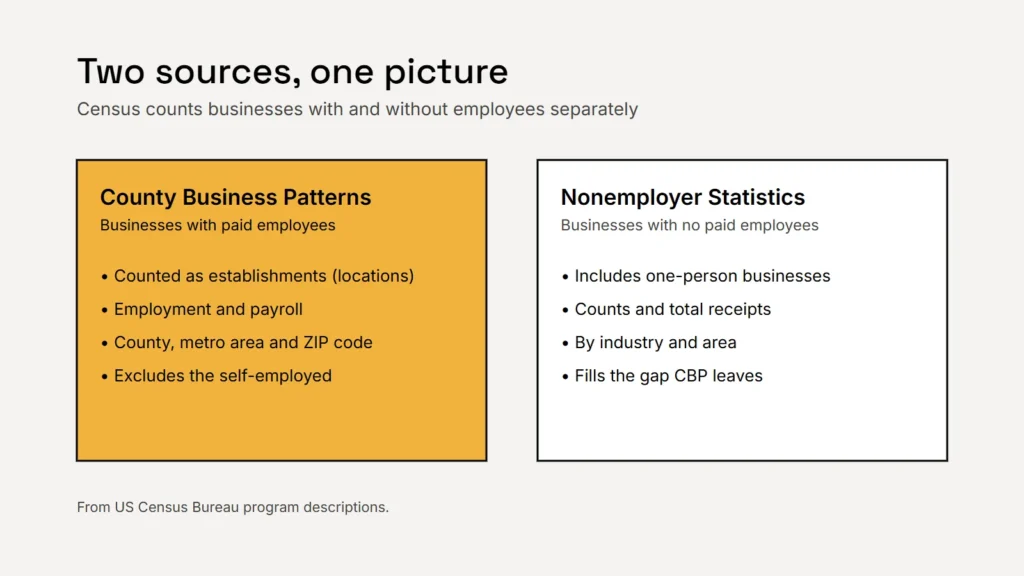
CBP excludes self-employed individuals and businesses without employees, along with some industries such as crop and animal production, private households and most government. That matters for trades and professional services, where many competitors are one-person operations. For those, the Census Bureau publishes Nonemployer Statistics, covering businesses with no paid employees, with counts and total receipts by industry.
How to look it up
- Find your industry code. Look up the NAICS code that best describes your business on the Census Bureau’s NAICS pages. Six-digit codes are the most specific.
- Open data.census.gov and search for County Business Patterns, or download the datasets. Tables are available there from 2012 to the latest year; the Census Bureau listed 2023 as the latest CBP data at the time of writing.
- Filter by geography: your county, metro area or ZIP codes.
- Add Nonemployer Statistics for the same industry and county to see one-person businesses.
- Look at the trend over several years, not one year alone.
A count of competitors is a starting point for questions, not an answer.
Read it carefully
| Watch out for | Why |
|---|---|
| Small counts | To protect confidentiality, the Census Bureau withholds or adjusts some figures; cells marked S are withheld |
| Disclosure methods changing | The Bureau has used noise infusion for CBP, and has said it is changing its approach in 2026; read the notes on each table |
| Industry codes | Businesses choose or are assigned codes; some of your competitors may sit in a neighbouring code |
| Timing | Data describe a past year, published later; recent openings and closures won’t show yet |
| Location ≠ market | A business counted in one county may serve several |
Turning counts into decisions
- Compare density: divide competitor establishments by the number of households or people in the area, using the Census population data from our market-sizing guide.
- Compare areas: neighbouring counties with similar populations but fewer establishments may be under-served, or may simply have less demand. Check both.
- Check what customers search for using Google Trends, and ask real customers using our interview guide.
Checklist
- Find your NAICS code.
- Use CBP for businesses with staff.
- Add Nonemployer Statistics for one-person businesses.
- Read the table notes on withheld figures.
- Compare density and trends, not single numbers.
Related service
Market research and data analytics
Market and competitor research built on public data.