Where people search depends on their phone, their habits and their apps. An iPhone user asking for directions may never open Google. Someone choosing a restaurant or a contractor may go straight to Yelp. Each of these can show your business with or without your help, so it is worth claiming the listings and checking what they say.
Start with one master record
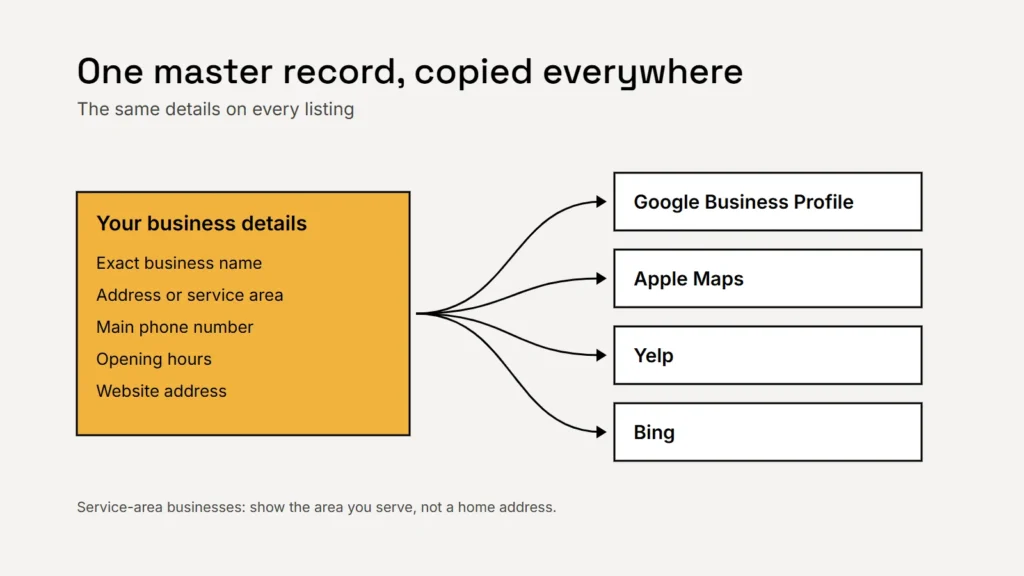
Before touching any listing, write down your business details once: the exact business name, address or service area, main phone number, opening hours, website address and a short description. Then copy them everywhere. Google’s guidelines for Business Profiles set a good standard for all of them: your name should reflect your real-world business name as used on your storefront, website and stationery, and adding extra keywords to the name isn’t permitted.
Key takeaway
Use exactly the same name, phone number and website on every listing. Small differences create confusion for customers and duplicates on platforms.
Apple Maps
Apple’s tool for businesses was called Apple Business Connect. Apple has since combined it with its other business services into Apple Business. Apple says you can claim your location on Maps and control how your business appears, with your logo, hours, images and key details. It also offers custom actions, so customers can book or schedule appointments, and Apple Ads on Maps if you want to advertise.
Start from Apple’s business site, find your business on Maps and claim it, and follow Apple’s guide for any checks it asks for. Then add your hours, photos and links.
Yelp
Yelp says it’s free to be on Yelp, and you can claim your free business page to update your information, add photos and respond to reviews and messages. It also sells advertising and page upgrades, which are optional. Claim the free page first and see whether customers in your trade use Yelp before paying for anything.
Yelp has its own rules on reviews, including how businesses may or may not ask for them, and they differ from Google’s. Read Yelp’s current guidelines in its support centre before you ask customers for Yelp reviews. Our article on asking for customer reviews covers the FTC and Google rules.
Bing
Microsoft runs a listing service for businesses on Bing, now reached through Bing’s business pages. Claim your listing there too and check the details match your master record. Bing’s own help pages explain the current sign-up and verification options, which have changed over time.
Every listing you don’t claim is one someone else can get wrong.
Service-area businesses: don’t show a home address
If you travel to customers, such as a plumber, cleaner or mobile therapist, Google says a service-area business should hide its address from customers and show the area it serves instead. P.O. boxes and remote mailboxes aren’t acceptable addresses on Google. Apply the same thinking on every platform: never publish a home address you don’t want customers turning up at.
Keep it accurate
| When | What to do |
|---|---|
| Now | Claim Google, Apple, Yelp and Bing listings; search for duplicates |
| Every change | Update hours, phone or address everywhere on the same day |
| Before holidays | Add special opening hours |
| Every quarter | Search for your business on each platform and check what customers see |
Checklist
- One master record of your details.
- The same name, phone and website everywhere.
- Apple, Yelp and Bing listings claimed.
- Home address hidden for service-area businesses.
- Each platform’s review rules read before asking.
- A quarterly check.
For Google itself, see our guide to local search for service businesses and our article on reading Business Profile performance data.