
For a plumber, HVAC company, therapist or consultant, a search ad appears at the moment someone is looking for exactly what you do. That is what makes it effective, and also why a careless setup is expensive. Here is a straightforward first campaign, using what Google’s own help pages say about each setting.
Search ads or Local Services Ads?
If you are a home service business, Google may also offer Local Services Ads, where you pay per lead rather than per click. Our guide to Local Services Ads explains them. Many businesses run both. This article is about standard search ads, where you choose the keywords and pay when someone clicks.
1. Set a budget you’re comfortable with
Google Ads works on an average daily budget. Google explains that on a given day a campaign might spend up to twice that amount to take advantage of busy periods, but over a month you won’t be charged more than 30.4 times your average daily budget. So set the daily figure from your monthly limit, not the other way round.
Key takeaway
A monthly budget of $900 means an average daily budget of about $30. Some days will spend more, some less.
2. Choose keywords, and the right match type
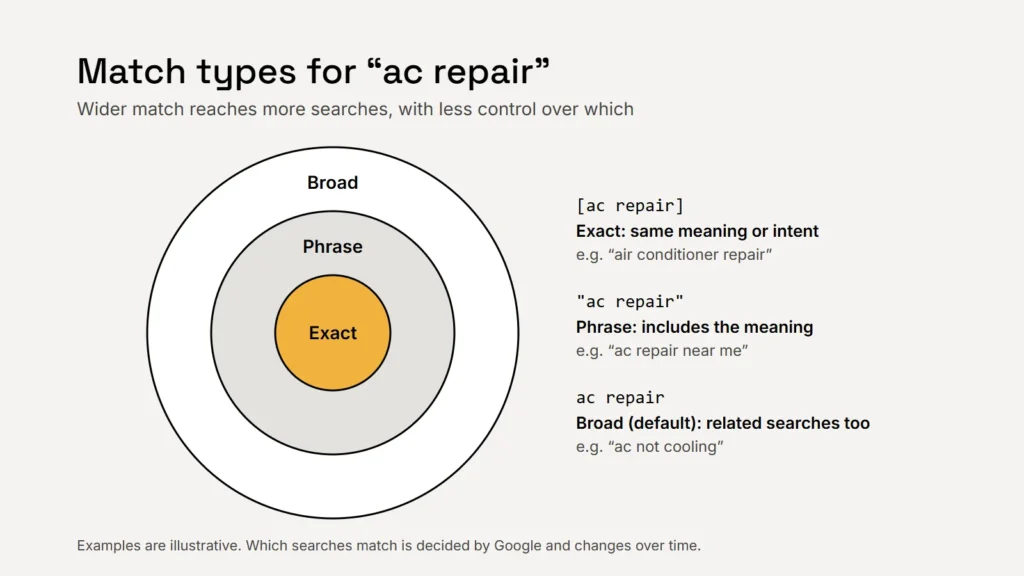
| Match type | How to enter it | What it does |
|---|---|---|
| Broad (the default) | ac repair | The widest reach, including related searches. Google recommends pairing it with Smart Bidding |
| Phrase | "ac repair" | Searches that include the meaning of your keyword |
| Exact | [ac repair] | Searches with the same meaning or intent. The most control, but the fewest searches |
For a small first campaign, a short list of phrase and exact match keywords for the services you most want is easier to control. Group keywords by service, so each ad and landing page matches what people searched for.
Add negative keywords
Negative keywords stop your ads showing for searches you don’t want. Google’s example is an optometrist adding “wine glasses”. A service business might add jobs, salary, course, DIY or free. Google also warns that too many negatives can stop you reaching customers you want.
3. Check your location setting
Target the areas you actually serve. Then check the option underneath. Google’s default, presence or interest, reaches people in or regularly in your area and people who have shown interest in it. Presence limits ads to people likely to be located, or regularly located, in your area. For a business that only serves local addresses, presence is often the safer starting point.
A cheap click from someone 300 miles away is not a bargain.
4. Track what counts: calls and enquiries
Google Ads calls a valuable action, such as a phone call or a completed enquiry form, a conversion. Without conversion tracking, you can only see clicks, not customers. For a service business, track:
- Calls from ads, using a call asset and call reporting. Google can count a call as a conversion when it lasts longer than a minimum length you set.
- Calls to the number on your website and taps on it on mobile.
- Completed enquiry or booking forms, tracked on the thank-you page or confirmation.
Tell visitors about this tracking in your privacy policy, and if you work in health or therapy, read our article on privacy for therapy practice websites before adding any tracking code.
5. Read the search terms report every week
The search terms report shows the actual searches that triggered your ads. It is where you find the wasted spend: add irrelevant terms as negatives and promising ones as keywords. Google notes that terms with too little activity aren’t listed.
Expect to verify your business
Google says all advertisers will eventually need to complete advertiser verification, answering questions about the organisation behind the ads. Some of those details can appear in ad disclosures and Google’s Ads Transparency Center, so make sure your business name is right.
Checklist
- Daily budget set from a monthly limit.
- A short list of phrase and exact keywords, grouped by service.
- Negative keywords for jobs, courses and DIY.
- Location set to presence for local-only services.
- Calls and forms tracked as conversions.
- Search terms reviewed weekly.
Pair your ads with UTM tags on other channels and you can compare sources by enquiries, not just clicks.
Sources
- Google Ads Help: About overdelivery and your average daily budget
- Google Ads Help: About keyword matching options
- Google Ads Help: About negative keywords
- Google Ads Help: About advanced location options
- Google Ads Help: About conversion measurement
- Google Ads Help: Measure calls from ads
- Google Ads Help: About the search terms report
- Google Advertising Policies Help: Advertiser verification