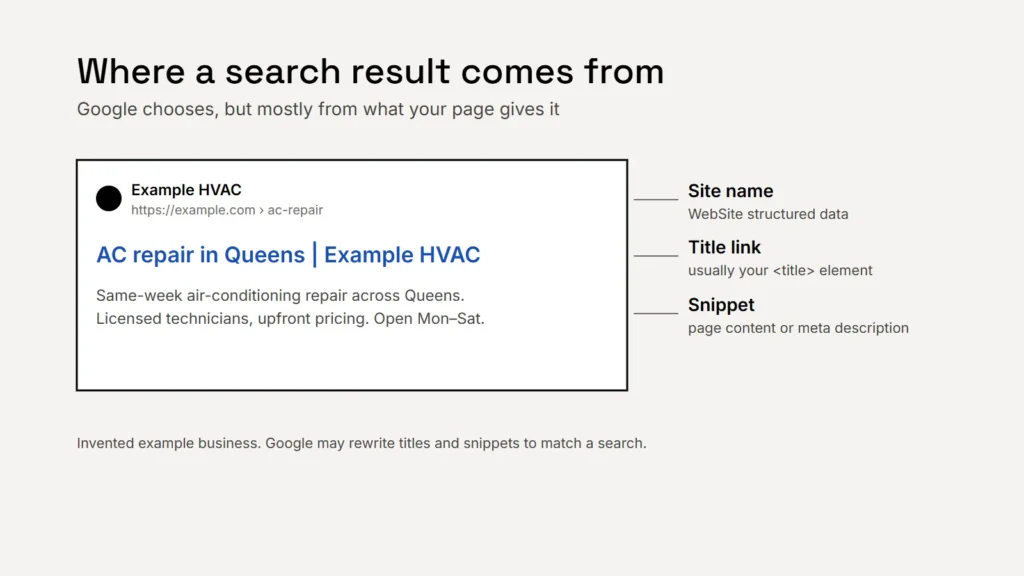
A search result has three parts you can influence: the site name, the title link and the snippet. Google says it can’t manually change them for individual sites, so the only way to improve them is to give it good material on your pages.
Title links: the most important line
Google builds the title link from several sources, including your page’s <title> element, the main visible title and headings, Open Graph titles and the text of links pointing to the page. Your <title> is the one you control most directly. Google’s best practices:
- Every page has a title, and it’s descriptive and concise. Avoid vague titles like “Home”.
- Each page’s title is distinct. Boilerplate repeated across pages doesn’t help.
- No keyword stuffing. There’s no reason to repeat the same words.
- Brand it briefly: your business name at the start or end, separated by a hyphen, colon or pipe.
- Make the main heading match. Google may use the first visible main heading if the title doesn’t describe the page.
Google sets no length limit but shortens titles to fit the device, so put the important words first.
Why Google rewrites titles
| Problem Google lists | Example |
|---|---|
| Half-empty titles | “| Example Plumbing” with nothing before it |
| Obsolete titles | An old year in the title after the page was updated |
| Inaccurate titles | A title that doesn’t describe what’s on the page |
| Micro-boilerplate | Near-identical titles across a set of pages |
| No clear main title | Several headings with the same large styling |
Key takeaway
A good title says what the page is, for whom, and who you are: “AC repair in Queens | Example HVAC”.
Meta descriptions: your sales line
Google says snippets come primarily from the page’s content, but it sometimes uses the meta description when it gives a more accurate summary. Snippets can also change depending on what someone searched for. A good description makes it more likely Google will use yours:
- Write a unique one for each important page. Google says identical or similar descriptions on every page aren’t helpful.
- Summarise the page, with the facts a customer wants: what you offer, where, when you’re open.
- No keyword lists. Google says strings of keywords are less likely to be shown.
- There’s no fixed length, but long descriptions are cut to fit the screen, so lead with what matters.
Google’s own example sets the tone. A list of products is a bad description; a better one is a plain sentence about what you can get and when the shop is open. For larger sites, Google says generating descriptions automatically from page data is fine, as long as they read naturally and differ from page to page.
Write the description for the person searching, not for the search engine.
Your site name
The name above the title link is the site name. Google says WebSite structured data on your home page is the most important way to suggest it, with your business name and home page address, plus an optional alternative name. Use a concise, commonly recognised name, not something generic like “Best Dentists in Iowa”. Our guide to structured data explains how to add it.
Checking your work
- Search for your business and your main services, and look at how your pages appear.
- In Search Console, look for pages with many impressions but few clicks: their titles and descriptions are worth rewriting first.
- Allow time. Google says changes can take a few days to a few weeks to show.
Checklist
- A unique, descriptive title on every page.
- Business name at the start or end, briefly.
- A main heading that matches the title.
- A plain-language description of each important page.
- WebSite structured data for your site name.
For what should be on the page itself, see service pages that earn search traffic.