Most service business homepages say too little too vaguely: a stock photo, a slogan like “Quality you can trust” and a menu. The visitor has to work out what you do. A homepage that gets calls does that work for them, section by section.
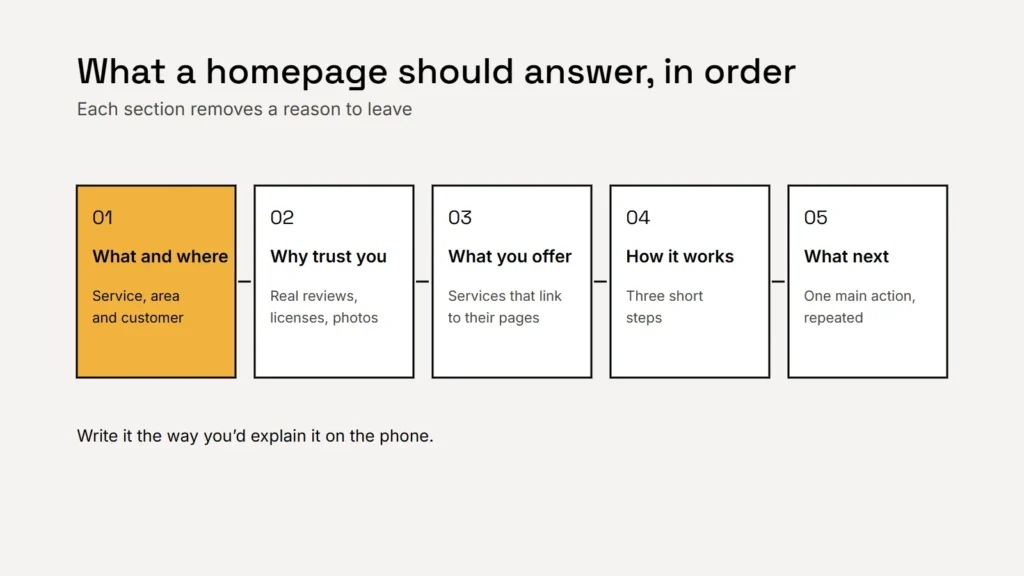
1. The headline: what you do, where and for whom
Your headline should pass a simple test: could a stranger tell what you do and where you work in a few seconds? A useful pattern is the service, the area and the customer, with a short line underneath that adds the reason to choose you.
| Vague | Clear (example wording) |
|---|---|
| Quality you can trust | Emergency plumbing across Austin, day and night |
| Your vision, our passion | Kitchen and bath remodels for Denver homeowners |
| Solutions for every need | Family dentistry in Tampa, with evening appointments |
Key takeaway
If your headline could appear on a competitor’s website unchanged, it isn’t doing its job.
2. One main action, repeated
Pick the one thing you most want visitors to do: call, request a quote or book. Put it in a button near the headline, and repeat it after each main section. On phones, make the number tappable. Too many equal choices make people hesitate.
3. Proof, close to the top
- Real reviews, quoted accurately, with the reviewer’s first name and town if they agreed. Never edit or invent them; our guide to asking for reviews explains the rules.
- Licenses, insurance and certifications you actually hold.
- Specific facts that are true, such as years in business or areas served.
- Photos of your real team and work, not stock images.
4. Your services, each linking to its own page
List your main services in short, plain blocks, each with a sentence on who it’s for and a link to a page with the detail. Write the links so they say where they go, such as “Water heater repair”, rather than “Learn more”. Google’s SEO starter guide says good link text tells users and Google something about the page you’re linking to.
5. How it works, in three steps
Show what happens after someone gets in touch: for example, call or send a request, get a visit or a quote, then the work is done. Three short steps reduce the fear of the unknown, and they’re a natural place to state what you charge for a visit or an estimate, if you do.
6. Answers, then a final call to action
Add a few short answers to the questions customers ask before they call, such as prices, areas and availability. Then end with your main action again, plus your phone number, hours and the areas you serve.
Write the way you’d explain your business to a customer on the phone. That’s usually the clearest version.
Writing tips that make every section better
- Use your customers’ words. Look at how they describe problems in calls, emails and reviews.
- Be specific. “Same day service in most of Austin” beats “fast service”, as long as it’s true.
- Cut words like “solutions”, “passionate” and “cutting edge”. They say nothing a customer can check.
- Keep paragraphs short and readable on a phone.
- Ask Google’s question of your page: is this the sort of page you’d want to bookmark or recommend?
Our free Lead Ready Website Playbook includes a homepage layout and copy templates you can fill in, plus 40 checks to score your current site.
Checklist
- A headline with your service, area and customer.
- One main action, repeated.
- Real proof near the top.
- Services linking to their own pages.
- How it works in three steps.
- Short answers and a final call to action.
Related service
Websites for US small businesses, planned around the questions your customers ask, with clear wording and one obvious next step on every page.