MDN describes HTTPS as an encrypted version of HTTP that uses TLS to encrypt all communication between a browser and a server. People still call the certificates behind it “SSL certificates”, after an older version of the technology. Whatever the name, MDN’s guidance is direct: all websites should serve all their pages and resources over HTTPS.
What HTTPS actually does
MDN explains that TLS secures a connection in three ways:
- Encryption: nobody in between, such as on public Wi-Fi, can read what is sent. That includes your enquiry form.
- Integrity: an attacker can’t secretly change the page or the data on the way.
- Authentication: the site proves it really is your domain.
It matters for search too, though less than people think. Google announced HTTPS as a lightweight ranking signal back in 2014, and its page experience guidance asks whether your pages are served securely. The bigger reason is trust: browsers warn visitors about pages that aren’t secure.
Key takeaway
HTTPS doesn’t make a site safe on its own, but a site without it can’t be trusted with any form.
Certificates: free, automatic and getting shorter
A certificate proves your site’s identity, and it expires. Let’s Encrypt, a free, automated certificate authority used by many hosts, issues domain validated certificates at no cost. The certificate lifetimes are shrinking across the industry:
| Change | Detail |
|---|---|
| Industry rule (CA/Browser Forum ballot SC-081, passed 2025) | Maximum certificate validity reduces from 398 days to 47 days, in steps between March 2026 and March 2029 |
| Let’s Encrypt default, from 10 February 2027 | Certificates valid for 64 days |
| Let’s Encrypt default, from February 2028 | Certificates valid for 45 days |
The practical message: renewal must be automatic. If your certificate is renewed by hand once a year, that won’t work for much longer. Most hosts, including the managed WordPress hosts many small businesses use, renew automatically; check that yours does, and that renewal warnings go to an inbox someone reads.
The three settings to check
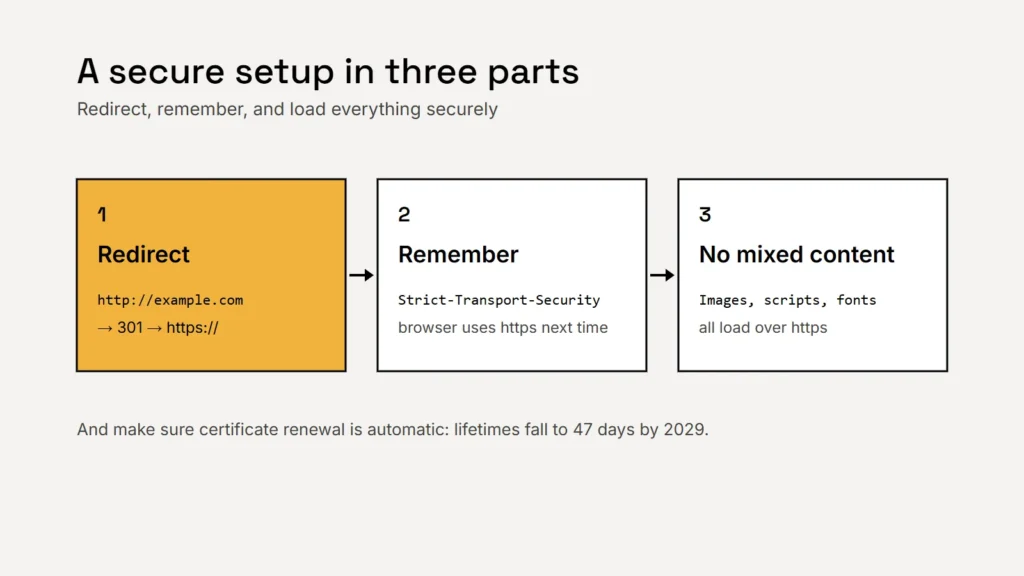
1. Redirect every http address to https
Visitors and old links will still use http://. Google recommends permanent server side redirects, such as 301 or 308, when moving to HTTPS, and says permanent redirects don’t cause a loss in PageRank. Check that both the www and non-www versions end up on the same https address.
2. Turn on HSTS
The Strict-Transport-Security header tells browsers that your site should only ever be accessed over HTTPS, so they upgrade future visits automatically. MDN recommends it alongside the redirect. Turn it on once you’re sure every part of your site works over HTTPS, because browsers will remember it.
3. Fix mixed content
Mixed content means a secure page loading something, such as an image or a script, over plain http. MDN explains that browsers now upgrade images, video and audio to https where they can, and block other insecure requests, such as scripts, stylesheets, fonts and embedded frames. A blocked script can quietly break a form or a menu. Old embeds and hard coded image links are the usual culprits.
Certificates are moving to lifetimes of weeks, not years. Renewal has to look after itself.
A quick check you can do today
- Type your domain with
http://in front. Does it land onhttps://? - Try it with and without
www. - Open the padlock or site information in your browser and check the certificate’s expiry date.
- Open your contact page and other key pages, and look for warnings in the browser’s developer console.
- Ask your host or developer: is renewal automatic, and who gets the warning emails?
Checklist
- HTTPS on every page.
- Automatic certificate renewal, with warnings someone reads.
- Permanent redirects from http and from the other www version.
- HSTS once everything works.
- No mixed content.
HTTPS is one part of a secure site: see our website security basics. And because certificates are tied to your domain, make sure you own your domain name.
Related service
Secure hosting, certificates and redirects set up and monitored.
Sources
- MDN Web Docs: HTTPS
- MDN Web Docs: Transport Layer Security (TLS)
- MDN Web Docs: Mixed content
- MDN Web Docs: Strict-Transport-Security
- Let’s Encrypt: About
- Let’s Encrypt: Decreasing certificate lifetimes to 45 days (December 2025)
- Let’s Encrypt: 64-day certificates (October 2026)
- CA/Browser Forum: Ballot SC081v3, reducing validity and data reuse periods
- Google Search Central: Site moves with URL changes
- Google Search Central Blog: HTTPS as a ranking signal (August 2014)