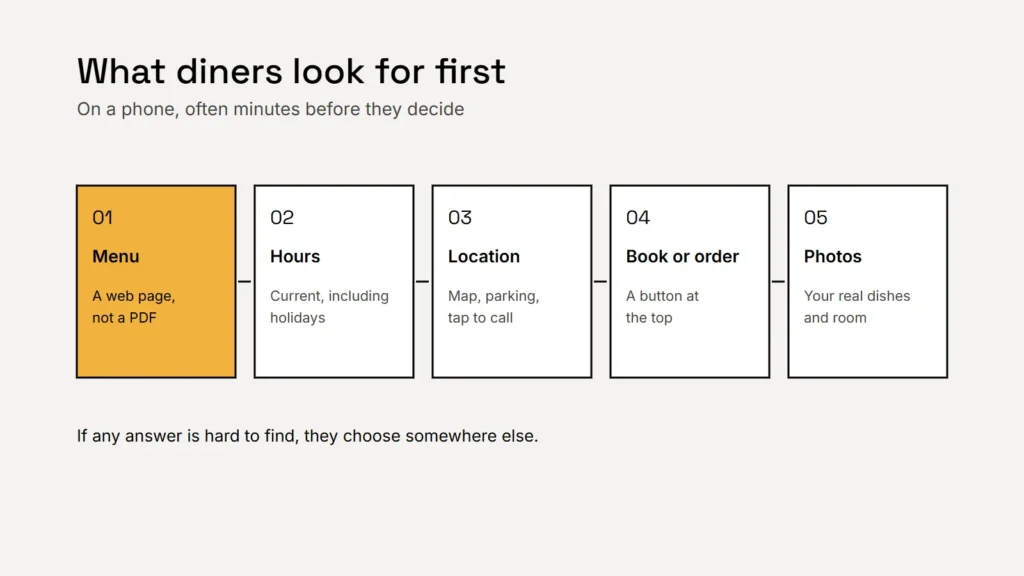
A restaurant website doesn’t need to be big. It needs to answer four questions quickly, on a phone, for someone who is hungry and deciding where to go: what’s on the menu, are you open, where are you, and how do I book or order?
A menu that works on a phone
A menu uploaded as a PDF or a photo is hard to read on a small screen, slow to load and invisible to screen readers. Put the menu on a normal web page instead:
- Sections and dishes as real text, with prices.
- Short descriptions that say what’s in the dish.
- Dietary labels, such as vegetarian or gluten free, only where they are accurate.
- A note on allergens and how guests can ask about them.
- A date or season, so diners know it’s current.
If your restaurant is part of a chain with 20 or more locations doing business under the same name and offering substantially the same menu items, the FDA’s menu labeling rules require calorie information on menus, including online menus. Check the FDA’s guidance for the details.
Key takeaway
A menu should be a web page, not a PDF. It loads faster, reads better and can be found in search.
Hours and location, always current
- Your hours on every page, and on your Google Business Profile, including holiday hours and special closures.
- Your address with a map link, parking notes and the nearest transit.
- A tappable phone number for questions and large parties.
Wrong hours are one of the quickest ways to lose a regular. Make updating them part of your weekly routine.
Booking and ordering without friction
Put the reservation button and the ordering link at the top of the page. If you use third party ordering or delivery services, consider offering direct ordering on your own site too. Google’s guidelines for Business Profiles also have rules for menu links, including that menu URLs can’t be direct links to third party ordering or delivery services, so check them when you set up your profile.
Hungry people don’t hunt. Menu, hours and a booking button, on the first screen of a phone.
Real photos and real reviews
Show your actual dishes, your dining room and your team. Diners can tell stock photos, and they want to know what they’ll get. Use real reviews only: the FTC’s rule on consumer reviews bans fake reviews and incentives conditioned on a review being positive.
Accessibility is part of hospitality
The US Department of Justice says the ADA applies to businesses open to the public, and its guidance on web accessibility lists common barriers: poor color contrast, missing text alternatives for images, videos without captions and pages that only work with a mouse. Restaurants are a frequent target of accessibility complaints, and accessible sites serve more guests. See our guides to website accessibility for small businesses and alt text.
Checklist
- The menu as a web page, with accurate prices and labels.
- Current hours, including holidays, everywhere.
- Address, map, parking and a tappable phone number.
- Booking and ordering buttons at the top.
- Real photos and real reviews.
- Accessibility basics checked.
Related service
Restaurant websites with phone friendly menus, booking and ordering links and the details diners need, kept easy for your team to update.