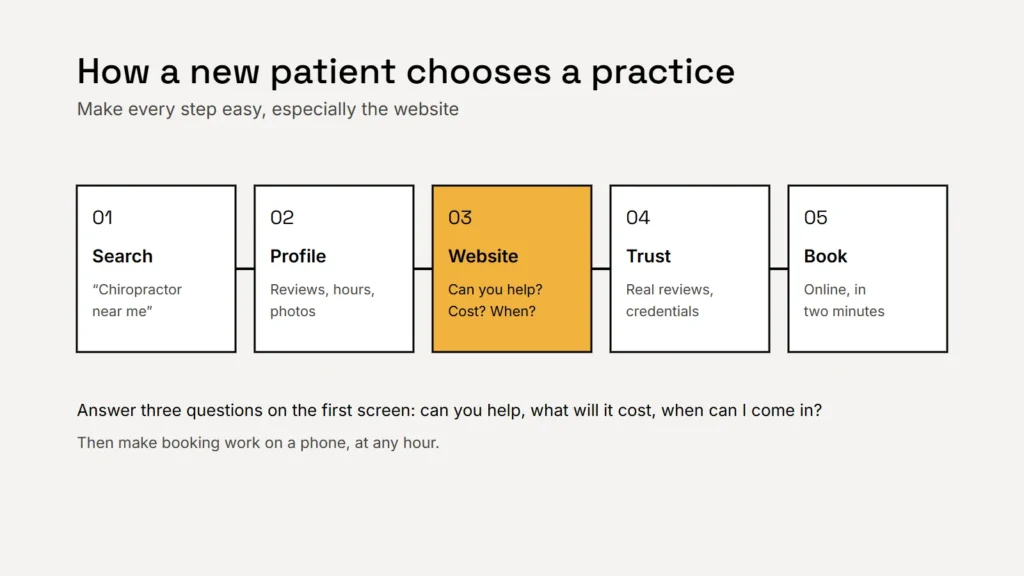
Someone with back pain searching for a chiropractor nearby usually wants three answers quickly: can you help with my problem, can I afford it (and do you take my insurance), and when can I get in? A website that answers those on the first screen, and makes booking a two-minute job, will win patients that a prettier but vaguer site loses.
The pages that matter
- A clear home page. Who you help, where you are, your hours, and a booking button and tappable phone number above the fold.
- A new patient page. What happens at the first visit, how long it takes, what to wear and bring, forms to complete beforehand and the cost or how insurance works.
- A page for each main service or concern. For example, back pain, neck pain, headaches, sports injuries or pregnancy care, if you offer it. Each page answers one need and helps you appear for that search.
- About the chiropractors. Real photos, qualifications, licences and what each practitioner focuses on. People are choosing a person, not just a clinic.
- Insurance and pricing. Which plans you accept, whether you’re in network, and self-pay prices or packages if you offer them.
- Location and contact. Address, a map, parking and accessibility details, and the areas you serve.
Key takeaway
Every page should make the next step obvious: book, call or ask a question.
Make booking effortless
Online booking is often the single biggest improvement. Patients search in the evening or at the weekend, when your front desk is closed. Practical points:
- Put a “Book a new patient visit” button in the header of every page.
- Use a scheduling tool that works well on phones and lets new patients book a first visit without calling.
- Show the phone number as a tap-to-call link, for people who still prefer to ring.
- Keep any enquiry form short: name, phone or email, and a brief note. Ask for medical details later, not on a public form.
- Send a confirmation with the address, parking and what to expect.
Our guide to contact forms that work covers the details.
Build trust honestly
Trust is what turns a visit to your website into a booking. The strongest signals are real: genuine patient reviews, real photos of your clinic and team, your credentials and clear prices. Two rules keep this on the right side of the law:
- Reviews must be genuine. The FTC’s rule on consumer reviews and testimonials, in force since October 2024, bans fake reviews and offering rewards only for positive ones. Ask every patient, and let the reviews fall where they may. See our guide to asking for reviews.
- Health claims must be backed up. The FTC expects health claims to be supported by competent and reliable scientific evidence. Describe what you treat and how, but avoid promising cures or results. Your state chiropractic board may also have its own advertising rules, so check them.
Describe what you treat and how you work. Don’t promise outcomes.
Patient privacy on your website
If your practice bills insurance electronically, it is very likely a HIPAA covered entity, and that affects your website. Intake forms that collect health details, online booking that records the reason for a visit, and patient portals all handle protected health information, so they need HIPAA-ready tools and, usually, a business associate agreement with the provider.
Be careful with tracking too. HHS guidance warns that analytics and advertising tags on pages where patients log in or book can disclose health information to the tracking company. Keep tracking off booking and intake pages unless the tool is set up for HIPAA. Our article on privacy for therapy practice websites covers the same rules in more detail.
Being found locally
- Complete your Google Business Profile with the right primary category, hours, photos and booking link, and keep it matching your website.
- Use your town or neighbourhood naturally on the home, contact and service pages.
- Add a page for each location if you have more than one clinic.
- List the practice on Apple Maps, Bing and relevant directories with the same name, address and phone number. See our listings guide.
- Make sure the site is fast and easy to use on a phone, because that’s where most local searches happen.
Checklist
- Booking button on every page.
- A new patient page that answers the first-visit questions.
- One page per main service.
- Genuine reviews and careful health claims.
- HIPAA-ready booking and forms, and no tracking on them.
Want to know how your current site measures up? Our free website review checks it against this list.
Related service
Websites for chiropractic practices that make booking easy and keep patient information safe.