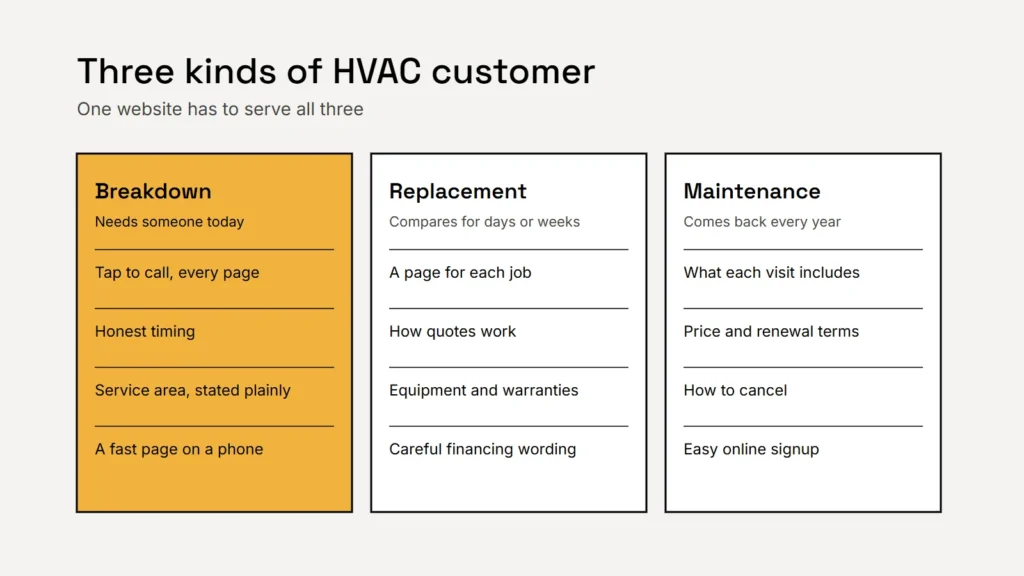
Most HVAC websites are built around one big “Call now” button. That works on the day the air conditioning fails, but it does little for the homeowner comparing three quotes for a new heat pump, or the one wondering whether a maintenance plan is worth it. Each of those visitors needs something different from the same website.
When the heat or the AC stops
This visitor is uncomfortable, often worried about family or pets, and will call the first company that looks able to come soon. In the first few seconds they need:
- A phone number they can tap at the top of every page.
- An honest answer on timing. Say whether you offer same day, evening or weekend calls, and keep that promise up to date through the seasons.
- Your service area, in plain words near the top of the page.
- A page that loads fast on a phone. Google’s Core Web Vitals suggest the main content should appear within 2.5 seconds. See our guide to Core Web Vitals.
Key takeaway
On a breakdown day, the website has one job: get the call. Everything else can wait further down the page.
When they’re replacing a system
A new furnace, air conditioner or heat pump is a big purchase, and people research it for days or weeks. Give them reasons to choose you:
- A page for each main job: AC repair, furnace repair, heat pump installation, ductless systems and indoor air quality, for example. Each page should explain what’s involved, what affects the price and what happens at the first visit. Our guide to service pages shows how.
- How quotes work. Most replacements need a visit to size the system properly. Say so, and say whether the visit is free.
- The equipment and warranties you offer, described accurately, with the manufacturer’s warranty kept separate from your own labor guarantee.
- A short quote request form that asks only what you need: the type of system, the age of the old one and the best way to reach them. See contact forms that work.
Financing, worded carefully
Financing helps people say yes to a new system, but credit advertising has federal rules. Under Regulation Z (12 CFR 1026.24), if an advertisement states certain “triggering terms”, such as the amount of any payment or the number of payments, it must also state other terms, including the annual percentage rate. So a line like “Only $89 a month” brings extra disclosures with it.
The simplest approach is to say financing is available, subject to approval, and link to your financing partner’s details. If you want to show payment examples, ask your lender for wording that includes the required disclosures. This is general information, not legal advice.
Maintenance plans: the steady work
A maintenance plan smooths out the seasons and brings customers back to you when a system eventually needs replacing. Give it its own page that explains:
- How many visits a year, and what each visit includes.
- The price, how it’s paid and whether it renews automatically.
- Any member benefits, stated precisely.
- How to cancel. Several states have automatic renewal laws, so make the terms clear before anyone signs up.
A breakdown needs a phone number. A new system needs a reason to trust you. A maintenance plan needs clear terms. A good HVAC website has all three.
Proof that you’re qualified
Homeowners want to know who is coming into their home. Show it plainly:
- Certification and licensing. The EPA requires technicians who service equipment that could release ozone depleting refrigerants to be certified under Section 608 of the Clean Air Act. Mention your certifications and your state contractor license where it applies.
- Insurance, stated accurately.
- Real photos of your team, vans and finished installs, not stock images.
- Real reviews. The FTC’s rule on consumer reviews bans fake reviews and incentives conditioned on a review being positive. See how to ask for reviews.
Keep it seasonal
Update the homepage message as the seasons change: cooling in early summer, heating in the fall. Keep your hours current on the website and your Google Business Profile, including holiday hours, and track calls and quote requests so you know which pages bring work. Our guides to counting enquiries in GA4 and Google Local Services Ads cover both sides.
Checklist
- Tap to call at the top of every page.
- Honest timing and a clear service area.
- A page for each main job.
- Financing worded with the required disclosures, or kept simple.
- A clear maintenance plan page.
- Certifications, license, insurance, real photos and real reviews.
Related service
Websites for home service businesses
HVAC, plumbing and electrical websites built to make the phone ring, with service pages, quote requests and tracked calls.